Reliable Image Masking for Scalable Image Production

Starting at $1.19 per image — Consistent, detail-safe image masking handled by experienced editors.

About Path Edit Studio

Professional Image Masking Service

At Path Edit Studio, our professional image masking service is built for businesses that need precise edge control and natural transparency. We work with ecommerce brands, photographers, agencies, and enterprises that require clean, accurate masking for images with hair, fur, fabric, glass, and soft edges.

All image masking is done manually by skilled editors using Adobe Photoshop. We do not rely on automated tools or AI-based masking. This manual process allows us to maintain full control over fine details, soft transitions, and transparency, ensuring each image looks natural and meets professional standards.

Our goal is simple: deliver high-quality masked images that are ready to use across websites, online marketplaces, catalogs, and marketing materials. Every image goes through quality checks to ensure consistency, accuracy, and reliable turnaround without compromising visual quality.

About Image Masking

What Is Image Masking?

Image masking is a professional photo editing technique used to separate a subject from its background while preserving fine details and soft edges. Instead of drawing hard outlines, masking allows precise control over transparency, making it ideal for images with hair, fur, fabric, glass, smoke, or soft transitions.

This method is especially effective for product and creative images where clean cutouts alone are not enough. Manual image masking helps retain natural textures, smooth edges, and realistic transparency that automated tools often fail to handle accurately. The result is a refined, professional image that looks natural and visually balanced.

Image masking is commonly used for ecommerce product images, fashion photography, catalogs, advertisements, and brand visuals where detail accuracy, consistency, and presentation quality are important.

Refined masking for clearer visuals and better buying decisions

Importance of Image Masking

Why Image Masking Is Important for Your Business

Product images play a major role in shaping how customers perceive your brand. When images have rough edges, missing details, or unnatural cutouts, it can reduce trust even if the product itself is high quality. Image masking helps preserve fine details and soft edges, ensuring products look clean, natural, and professionally presented.

Unlike basic cutouts, image masking allows precise control over transparency and edge softness. This is especially important for products with hair, fur, fabric, glass, smoke, or reflective surfaces. By keeping these details intact, image masking improves visual accuracy and makes products easier for customers to understand and trust.

For ecommerce stores, where buying decisions are driven largely by visuals, well-masked images create a smoother and more realistic viewing experience. Customers can clearly see product shape, texture, and quality, which helps reduce hesitation and improves engagement.

Image masking also supports consistency across large product catalogs. When all images follow the same masking quality and visual style, the brand looks more organized and professional. This consistency strengthens brand credibility, improves user experience, and directly supports higher conversion rates over time.

Preserved Fine Details

Accurate Product Representation

Consistent Visual Quality

Stronger Buyer Confidence

Image Masking Cost

How Much Do Image Masking Services Cost?

Image masking costs vary based on image complexity, detail level, quantity, and turnaround time. Images with fine details require more precision and time.
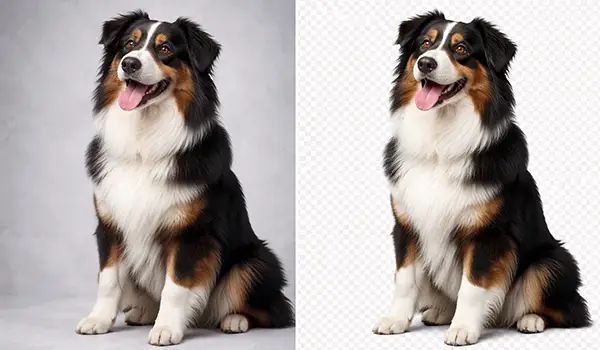
Photoshop Layer Masking

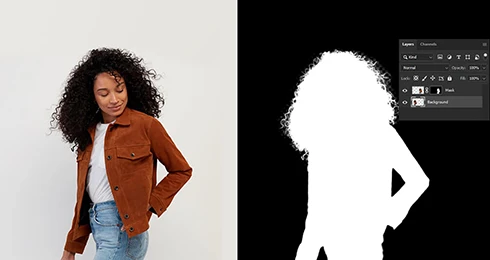
A layer mask is a non-destructive Photoshop technique used to control which parts of an image are visible or hidden without affecting the entire image. Instead of lowering overall opacity, layer masking allows precise adjustments to specific areas, making parts transparent or partially visible. Painting with black hides areas of the image, while white restores them, and using a soft brush helps create smooth, natural transitions.

At Path Edit Studio, we use layer masks to maintain full control over details and edges, ensuring clean, flexible, and professional results that can be refined at any stage without damaging the original image.

Starting at $0.15/image

Fur or Hair Masking

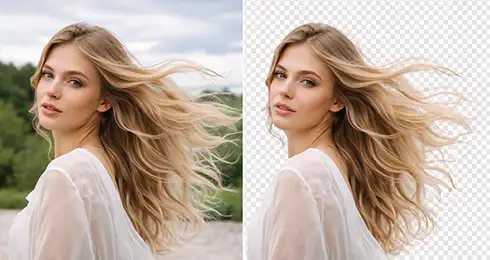
Fur or hair masking requires advanced skills because these images contain soft edges, fine strands, and complex curves that are difficult to separate cleanly.

Using basic cutouts or clipping paths often fails to preserve natural details, which can make the image look rough or unrealistic. At Path Edit Studio, we use professional image masking techniques in Photoshop to handle hair, fur, fabric, and similar textures with precision.

Our editors carefully adjust color, brightness, and exposure where needed to keep details natural and realistic, delivering clean, high-quality results that standard clipping methods cannot achieve.

Starting at $0.29/image

Transparent Object Masking

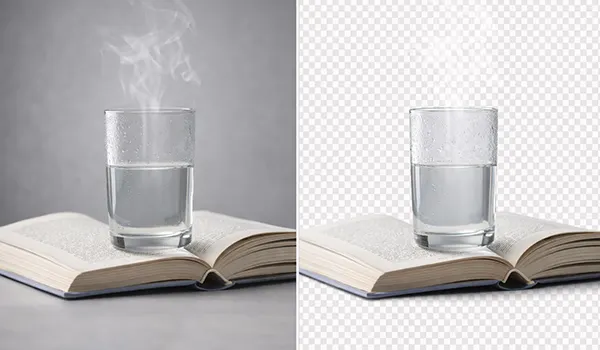
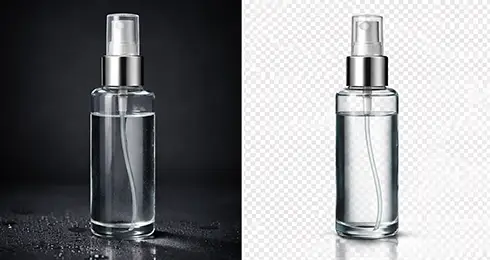
Working with transparent objects requires careful attention, as both the foreground and background remain partially visible through the product. Image masking is used when objects have very low opacity, allowing light and background elements to pass through naturally. At Path Edit Studio, our editors manually apply advanced masking techniques to accurately separate and place transparent items on any background while preserving clarity and realism.

This method is essential for images like glassware, water bottles, jars, car windows, and spectacles, where maintaining transparency and natural color flow is critical. The result is a clean, realistic image that keeps the product’s true appearance intact.

Starting at $0.49/image

Color Masking

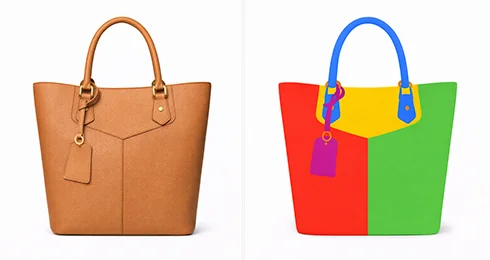
Color masking is a photo editing technique used to isolate, adjust, or control specific colors within an image while keeping other areas unchanged. By applying masks, editors can limit visible colors to selected shades and fine-tune pixel details with accuracy. This method allows precise control over color channels, transparency, and tonal balance, often using RGB values and alpha channels for custom pixel data.

At Path Edit Studio, our editors use color masking to refine visuals, manage grayscale or selective color edits, and deliver clean, consistent results that look natural and professional.

Starting at $1.99/image

Alpha Channel Masking

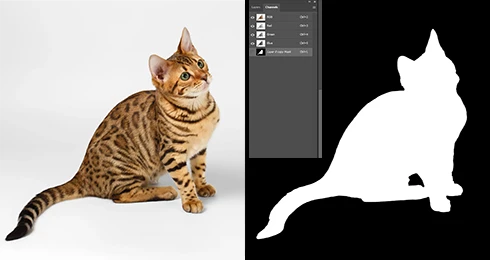
Alpha channel masking is different from layer masks or clipping masks and is used when images require advanced control over transparency, brightness, contrast, or exposure without losing quality. This technique is especially useful for complex images that include scattered hair, fur, soft edges, or uneven transparency, where standard methods are not effective. Alpha masking allows precise separation of the subject while keeping fine details intact and maintaining the original image quality.

At Path Edit Studio, our experienced editors use alpha channel masking to handle challenging images with accuracy and care, delivering clean, professional results that are difficult to achieve without expert-level skills.

Starting at $4.29/image

Photoshop Refine Edge Masking

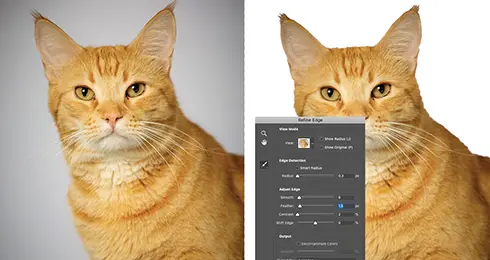
Sometimes images develop rough or uneven edges that make it difficult to blend layers smoothly, especially when placing a subject on a new background, replacing a sky, or combining multiple exposures for effects like sunsets. To handle this, Adobe Photoshop offers advanced tools such as Refine Edge, which allows editors to fine-tune selections and manage intricate details with greater control.

At Path Edit Studio, our editors use these tools expertly to clean up complex edges in areas like human hair, fur, fabric, trees, and textured objects, ensuring smooth blending and natural-looking results without visible cut lines or harsh transitions.

Starting at $4.29/image

Translucent Image Masking

Translucent masking is a specialized image masking technique used for objects that allow light to pass through and have partial transparency. This method is applied when background colors or unwanted elements need to be removed while preserving the natural see-through effect of the product. At Path Edit Studio, our skilled editors manually handle translucent objects with care, ensuring accurate transparency and realistic results without damaging image quality.

This technique is commonly used for items like sunglasses, sheer fabrics, bridal veils, frosted or ice-covered glass, and paper, where maintaining clarity and softness is essential for a professional finish.

Starting at $4.29/image

Collage Masking

Collage masking is a creative photo editing technique mainly used to remove backgrounds and combine multiple images into a single, visually appealing composition. It is widely used for commercial materials such as brochures, catalogs, magazines, leaflets, and websites. Through careful selection, copying, and placement, designers merge different images while maintaining balance and visual flow.

At Path Edit Studio, collage masking allows us to highlight or blur backgrounds based on client needs, enhance focus on key elements, and give photos a fresh, unique appearance that fits branding and marketing goals.

Starting at $4.29/image

Pricing

Transparent Pricing

We offer straightforward, project-based pricing tailored to the complexity and volume of your needs. Choose the solution that best fits your workflow and budget.

Loading calculator...
Why Choose Us

Why Choose Path Edit Studio?

Global Clients
0 K+
Images Edited
0 M+
Experience
0 Y+
Employees
0 +

Path Edit Studio is trusted by clients who value precision, reliability, and consistent quality. We focus on manual craftsmanship, not shortcuts, because we understand that your images represent your brand.

Our team is experienced in handling both small projects and high-volume image orders. Every image goes through quality checks to ensure clean edges, accurate paths, and consistent results. We also offer a free sample so clients can review our work before committing to a full order.

With fast 6-hour turnaround, secure file handling, and professional support, we aim to build long-term partnerships rather than one-time edits.

Why this is for

Perfect for These Businesses

Outsourced photo editing makes sense when quality, speed, and consistency matter. Path Edit Studio is a great fit if you’re one of the following:

eCommerce Store Owners

Focus on growing your store while we handle clean, consistent product images that meet marketplace standards and build buyer trust

Product Photographers

Save time on post-production without compromising quality. We support your workflow with precise, manual edits that match your style.

Marketing Agencies

Scale client projects easily with reliable editing support, consistent output, and fast turnaround for campaigns and catalogs.

Amazon Sellers

Get marketplace-ready images that follow Amazon guidelines, improve listing quality, and help products stand out in search results.

How It's Work

Fast, Easy, and Reliable Workflow

01

Upload & Describe

Tell us what you need — background removal, clipping, or both

02

We Edit By Hand

Expert editors refine each image with accuracy.

03

Get Ready-To-Use Images

Delivered in hours — straight to your inbox.

Our Portfolio

See Our Work in Action

From soft hair edges to transparent objects, explore precise image masking crafted by hand for clean, natural results.

Image gallery marquee
Testimonials

What Our Clients Say

Our clients trust us for consistent quality, fast delivery, and reliable support on every project.

Trusted By

Trusted by Leading Brands

Leading brands rely on Path Edit Studio for accurate image masking that preserves fine details and delivers professional-grade visuals.

Image gallery marquee
FAQs

Frequently Asked Questions

Get quick answers to common questions about image masking, including pricing, complexity levels, and how to get started.

What is image masking, and when do I need it?

Image masking is used when images have hair, fur, transparent, or soft edges that can’t be handled with clipping paths. It helps keep fine details natural while removing or changing the background.

How do I know which image masking level is right for my images?

It depends on edge complexity. Images with minimal transparency usually fall under basic or simple masking. Full hair, fur, or mixed transparency may require medium or complex masking. If you’re unsure, our team can guide you.

 
Are image masking edits done manually?

Yes. All image masking at Path Edit Studio is done 100% manually. We don’t use AI or automated tools, ensuring clean edges, natural transitions, and accurate details.

 
Can you handle bulk or ongoing orders?

Yes. We’re set up for both small batches and high-volume projects. Our workflow is designed to scale while maintaining consistent quality across large product catalogs.

How fast is your turnaround time?

Most orders are delivered within hours, depending on volume and complexity. We also support urgent requests when you need images ready quickly for launches or campaigns.

Do you offer revisions if I’m not satisfied?

Absolutely. We offer revisions to make sure the final images match your expectations. Your satisfaction and long-term trust matter to us.